Ultiboard is a highly efficient printed circuit board (PCB) design software that accelerates PCB prototyping through better integration with Multisim. Through its flexible layout tools and powerful automation features, Ultiboard empowers designers with greater design freedom and efficiency. Whether you are a beginner or an experienced engineer, Ultiboard provides a range of available tools and options that make PCB design easier and more intuitive. At the same time, the software supports export in a variety of standard formats, facilitating the subsequent manufacturing process and improving overall design efficiency.
Ultiboard Introduct
Ultiboard is a professional printed circuit board (PCB) design and layout software that seamlessly integrates with Multisim software to accelerate PCB prototyping.Ultiboard software provides efficient PCB design layout and routing capabilities with a customizable environment. Users can use flexible tools to manually place components and copper wires precisely to define critical board elements. With its automation features, users can complete designs quickly. Ultiboard also provides advanced table views, toolboxes and design wizards to help users easily manage, control and define any board layout. The software also supports export of industry-standard file formats such as Gerber and DXF, ensuring a complete design flow from schematic to layout.
- Software: Ultiboard
- Cost: Paid
- Website: https://www.ni.com/en-us/shop/product/ultiboard.html
- Launched: undisclosed
- Company: NI
Ultiboard Features
Ultiboard is equipped with a number of powerful core features designed to improve the efficiency and quality of PCB design. First, the software provides flexible layout and routing tools, enabling designers to accurately locate components and circuit connections; second, Ultiboard supports seamless integration with Multisim, simplifying the interaction between schematic and PCB design. Meanwhile, the design toolbox and automation features can effectively shorten the design cycle. In addition, users can easily manage the various layers of the board through the advanced tabular view, ensuring high control and visualization of the design. ultiboard is also capable of exporting files in Gerber, DXF, and other formats to meet industry standards in order to facilitate the subsequent manufacturing process.
- Efficient Layout and Routing Tools.Ultiboard provides flexible tools to quickly and accurately lay out components and circuits for optimized layout.
- Seamless integration with Multisim.Integration with Multisim allows users to easily switch between schematic and PCB design, improving productivity.
- Automated Design Functions.Automation tools can complete designs quickly, helping designers save time and reduce error rates.
- Export industry standard formats.Support for exporting standard file formats such as Gerber and DXF ensures that the design process meets manufacturing needs.
Ultiboard Turorial
Learning PCB design software, always encounter some problems, through some videos or community, we can solve the problem more quickly, here are a few tutorial sites we prepared for you to learn Ultiboard.
- RAYPCB: RAYPCB provides detailed Ultiboard PCB design tutorials to help users get up to speed quickly with basic workflows and features. The site is recommended because of its concise and easy-to-understand content for beginners, which enables users to understand how to do simple circuit board design.
- PCBCart: PCBCart's Ultiboard PCB design tutorials are very practical, covering multiple steps from file opening to new designs, and are ideal for beginners. This site is recommended because it provides clear step-by-step instructions that help users build practical skills for learning.
- OSH Park Docs: The Ultiboard tutorial provided by OSH Park Docs focuses on design rule set and is suitable for users to understand advanced features. This site is recommended because its content is well-targeted for users with some basic knowledge to further improve their design skills, making it a good resource for upgrading skills.
- NI Community: The NI Community's forum provides a simple ultiboard tutorial that is perfect for those who want to start with the basics. This site is recommended because it not only has tutorials, but also actual user interaction, making learning more vivid and realistic.
- WellPCB: WellPCB offers the ultimate guide for Ultiboard, perfect for beginners and experienced designers alike. This site is recommended because of its detailed content and clear explanations that help users master all aspects of PCB design.
Ultiboard Reviews
According to user feedback, Ultiboard is a PCB design software that has been used for many years, and although it performs well in some aspects, it also has several shortcomings. Users generally report that it is difficult to convert file formats, especially when importing netlist and Gerber files, resulting in a less smooth design flow. In addition, project management functionality is relatively lacking, and users would like to automate some administrative tasks to save time. Users are also concerned about the lack of library support, especially the challenges faced by new users when making a selection. While some users remain satisfied with Ultiboard's basic functionality, other software such as KiCad is perceived to offer a better experience and support for newcomers. Overall, there is a market for Ultiboard among experienced users, yet it appears to be less attractive to new users.
- Difficulty in converting file formats.I don't know of any way to convert the file to another format except by "simulating holes" - importing the netlist and the Gerber file. This doesn't help much because Gerber is a flat graphic and can't contain EDA objects.
- Your experience with KiCad.I have been using UltiBOARD for a long time. I finally chose KiCad, which works very well and is the best PCB program I've ever used, although there are still some rough spots.
- Difficulties in project management.Right now all component management is manual. It would save a lot of time if the software took over some of the project management burden.
- Export and Import Functions.File import/export is a very rudimentary feature in KiCad, but I know that Pcbnew can export layers to SVG files and can import layers from DXF files.
- Instructions for using the Novo tool.Recently I decided to redo a tool that allows you to draw full component shapes, including mats, in AutoCAD and import that DXF into an Ultiboard design file.
- Ultiboard user comments.In our company, we have several layout programs running at the same time. I use Ultiboard, my co-worker uses Altium, and another co-worker uses Kicad, because our customers require us to use a layout program in order to be consistent with their own systems. My clients are Ultiboard users and I have been using them for 15 years. While Ultiboard may not have all the features a designer could dream of, I design 25 of them a year and never feel like I'm missing anything.
- Insufficient library support for recent packages: theMy warning to new users is that we spent a lot of time but ended up switching platforms, so for new users I would recommend that they better consider PCB design packages rather than having to do PCB design under the NI software package.
- Consolidated view.Overall, NI seems to be focusing all of its efforts on Multisim, which may be fine for experienced users who like Ultiboard, but may be disappointing for newcomers to PCB design.
- The KiCad Advantage.As a new user, I would suggest that KiCad is an excellent choice for PCB layout because it is free, open source, has a large number of 3D modeling parts and modules, and is compatible with other software.
- Reflections on the GUI Experience.My experience working in Altium frustrated me with its complexity, so I went back to Ultiboard, which doesn't have all the features that designers dream of, but I'm quite happy with it because the designs I can get done each year aren't compromised.
- Problems exporting virtual components.I designed the circuit for the cell phone detector in NI MULTISIM -11 and then decided to transfer the content to NI-ULTIBOARD -11 to design the PCB. while transferring it shows that some of the virtual components cannot be exported.
- Difficulties in editing scripts.I found that I had to edit the scripts for each circuit component to make it transferable to ULTIBOARD. editing the scripts for each component was tedious, even including the resistors.
- Confusion over selecting scripts: theI'm not sure which script to choose because it lets me manually select from multiple scripts. Each script looks different in ULTIBOARD.
- Want to auto-select scripts.I would like to know if there is an option in NI MULTISIM - 11 to automatically select the default script for a device? Is there an easier way to select the device's script in NI MULTISIM - 11?
Articel Comments
After evaluating Ultiboard, I give this software 4 stars (★★★★☆). Although Ultiboard offers many useful features in PCB design, the difficulty in converting file formats and the lack of project management make it a program that new users may encounter obstacles in using. Overall, Ultiboard is popular among experienced users, but newcomers may need more support and learning resources.
- Layout and Routing Flexibility.Ultiboard provides flexible layout and routing tools that enable designers to precisely place components and optimize circuit layouts.
- Seamless integration with Multisim.The software is tightly integrated with Multisim, simplifying the flow of schematic and PCB design and improving work efficiency.
- Design automation functions.Ultiboard's automation features significantly reduce error rates and shorten design cycles, supporting efficient workflows.
- Export Standard Format.Support for exporting file formats such as Gerber and DXF ensures a smooth and compatible design process.
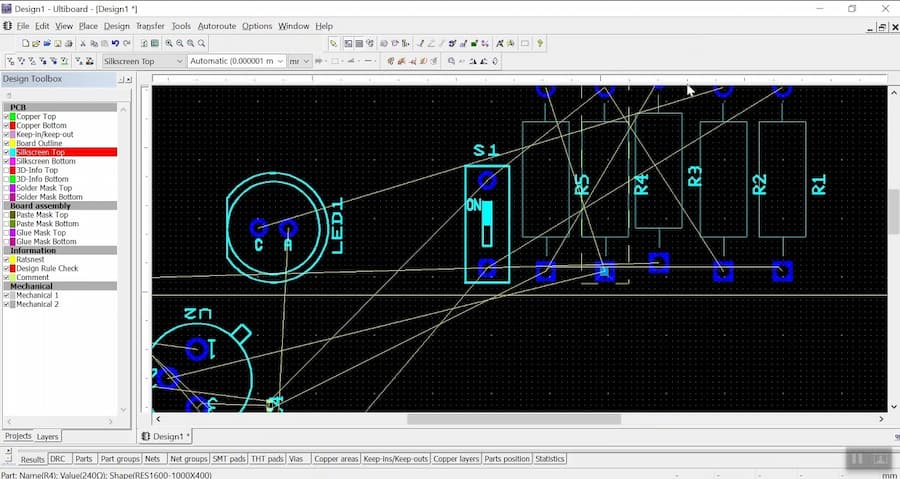
Overall, Ultiboard is a powerful PCB design tool that has a learning curve for novice users, but its powerful features and tools make it still occupy an important position in the electronic design field. Although some users have reported several shortcomings, such as format conversion problems and lack of project management features, its integrated design interface and high degree of customizability still attract many professional users. If you are a professional PCB designer and need a reliable design tool, Ultiboard will be a worthy choice.

