ExpressPCB is a PCB CAD design software for electronics engineers, designers, students and hobbyists. It is an industry leader for its ease of learning, free to use and fast ordering. With over 25 years of history, ExpressPCB provides an easy-to-learn, design, and direct ordering ecosystem for professionals and students.
Introduction to ExpressPCB
- Software Name: ExpressPCB
- Software website: ExpressPCB
- Release Time: Over 25 years
- Cost: Free
- Operating platform: Windows
ExpressPCB Core Functions
ExpressPCB offers competitive core functionality with its powerful features and user-friendly interface. In addition, ExpressPCB is constantly updated and improved based on user feedback. For example, in the latest version 3.2, the support for symbols used in ExpressSCH Plus has been enhanced, improving the speed, stability and quality of the tool. In addition, ExpressPCB provides UL, Lot Code and Date Code markers for enhanced product traceability.
- Multi-layer board design: Supports PCB designs with up to 6 layers, including planar, signal or hybrid inner layers.
- Accurate Aperture Setting: Provides aperture sizes from 0.006“ to 0.250” to meet different design requirements.
- Editable Pad Mask: Users can edit the pad mask as needed to fit different design requirements.
- Dual-sided silkscreen: Supports both top and bottom silkscreen, enhancing the readability and professionalism of the design.
- Integrated Design Rule Check (DRC): Built-in DRC function helps users to detect and fix potential problems in time during the design process.
- SnapEDA Integration: Partner with SnapEDA to provide integrated access to a powerful online library of component parts, including verified symbols and pads, reducing time from concept to design.
- Schematic Linking: Supports schematic linking with ExpressSCH, simplifying the layout process.
- Highlighted Networks: Facilitates quick identification and handling of network connectivity issues.
- Extended Pad Shapes: Includes oval, octagonal, and offset drilled holes for more design flexibility.
- Multi-step undo function: Allows users to perform multi-step undo operations during the design process to improve design efficiency.
- Design Notes: Users can add notes to their designs for easy documentation and communication.
- Bill of Materials (BOM): Integrated BOM functionality helps users manage and reconcile materials.
- Direct Quote and Order List: Users can get quotes and place orders directly from the software, simplifying the manufacturing process.
ExpressPCB Tutorials
We have found some tutorials on how to use ExpressPCB that will help you get the most out of the software.
- ExpressPCB Tutorials - ExpressPCB: This is the official tutorial page for ExpressPCB, offering a wealth of video tutorials and quick tips, perfect for beginners to get started quickly and improve their design skills. Covering everything from linking schematics to printing internals, the videos are an indispensable resource for learning ExpressPCB.
- Printing “ExpressPCB”: This is a quick start guide to ExpressPCB, providing detailed step-by-step instructions from schematic linking to PCB layout for users who need to get started quickly. Although the content is basic, it is very practical and will help the user to quickly understand the basic operation of the software.
- ExpressPCB Tutorial - Step By Step For More Information: This tutorial provides a basic introduction and guide to using ExpressPCB, showing how to export Gerber files from ExpressPCB. It is detailed and suitable for users who need an in-depth understanding of the software's features and the export of manufacturing files.
- ExpressPCB User's Manual & Online Help: This is the user's manual for ExpressPCB and contains a detailed introduction to the software and online help. The manuals are comprehensive and are suitable for users who need an in-depth understanding of the details and advanced features of the software.
- EXPRESS PCB TUTORIAL wtih JW&KD NOTED CORRECTION: This is a revised version of the ExpressPCB tutorial detailing the steps involved in designing a PCB using ExpressPCB. The tutorial is detailed and suitable for users who need an in-depth understanding of the software operation and design flow.
ExpressPCB Tips and Tricks
Some tips on using ExpressPCB can make us more efficient in our work, the following is our summary of some ExpressPCB tips for you:
- Power and Ground Layout: When working with ICs, make sure you use solid power and ground wires with a wide wire connection to the common rail of the power supply. Avoid snaking or daisy-chaining power lines to minimize resistance and noise.
- Signal Cable Placement: To minimize signal interference and delay, signal cables should be as short and straight as possible. Use through-holes to transfer signals from one layer to another and place vertical alignments on one side of the board and horizontal alignments on the other.
- Alignment width and clearance: Select the proper alignment width based on the amount of current; low-current signal lines should be 0.010 inches wide, while high-current alignments should be wider. Make sure there is at least a 0.007-inch gap between the alignment and adjacent alignments or pads to avoid short circuits.
- Alignment Grid and Alignment Angle: Turn on the Alignment Grid feature and set the proper grid spacing, such as 0.050 inches, for a dense layout. Limit the alignment direction to horizontal, vertical, or 45-degree angles to avoid right-angle turns, especially when placing narrow wires.
- CHECKING AND VERIFYING: After completing the wiring, double-check the wiring for each signal to make sure there are no omissions or errors. Check the top and bottom of the layout to ensure that gaps are met, that there are no crossed traces, and to verify that all metal components do not short to the top-level alignment.
ExpressPCB User Reviews
ExpressPCB is liked by PCB designers, but there are some drawbacks, here are a few reviews of ExpressPCB that can be provided for your reference.
- PCBShopper ExpressPCB Reviews - PCBShopper: Users comment that ExpressPCB is easy to use and can probably be learned in a day. However, it is also noted that users are locked into specific PCB manufacturers, which may limit flexibility of choice.
- G2 ExpressPCB Plus Reviews 2024: Details, Pricing, & Features | G2: Users find that ExpressPCB Plus has all the libraries and features that beginners and advanced users need. It's a great choice for low-cost, limited edition boards that need a quick turnaround.
- Reddit I have expressPCB but I need cheaper PCBs for really basic projects: A user on Reddit discusses ExpressPCB and seeks cheaper PCB options. This suggests that some users may be cost sensitive and are looking for a more economical solution.
- Trustpilot Read Customer Service Reviews of www.expresspcb.com: 3 users on Trustpilot have reviewed Expresspcb. These reviews relate to their personal experiences and opinions of the ExpressPCB service and can provide potential users with a reference.
- Reddit ExpressPCB vs. KiCAD?: In Reddit's ECE community, users compare ExpressPCB and KiCAD. this comparison can help users choose the right PCB design software based on their needs and preferences.
Rating: ★★★★☆ (4/5) Reasons for Comments:
- Ease of use: ExpressPCB is widely recognized by users for its user-friendly interface and ease of learning. The software offers an intuitive flow of operations that allows even beginners to get started quickly, as demonstrated by several user reviews.
- Free and Comprehensive: As a free PCB design software, ExpressPCB provides an integrated solution from design to manufacturing, including multilayer board design, precise aperture settings, integrated DRC, and other features that make it stand out among free software.
- Direct Ordering Convenience: A significant advantage of ExpressPCB is the ability to get quotes and place orders directly from the software, greatly simplifying the manufacturing process, which is a huge advantage for rapid prototyping and small projects.
- User Support: According to user feedback, ExpressPCB offers U.S.-based technical support with fast response times, which is one reason for the high level of user satisfaction.
- Limitations: However, ExpressPCB has some limitations, such as not supporting the generation of Gerber files for use by other manufacturers, which limits user options and can result in additional costs. In addition, some users cited limitations in the software's mechanical design capabilities, such as the inability to create internal slots and openings, and limitations on the size of drilled holes.
- File format issues: Some users mentioned the proprietary nature of the ExpressPCB file format, which may result in limited use in other manufacturing services and additional fees to convert to Gerber format.
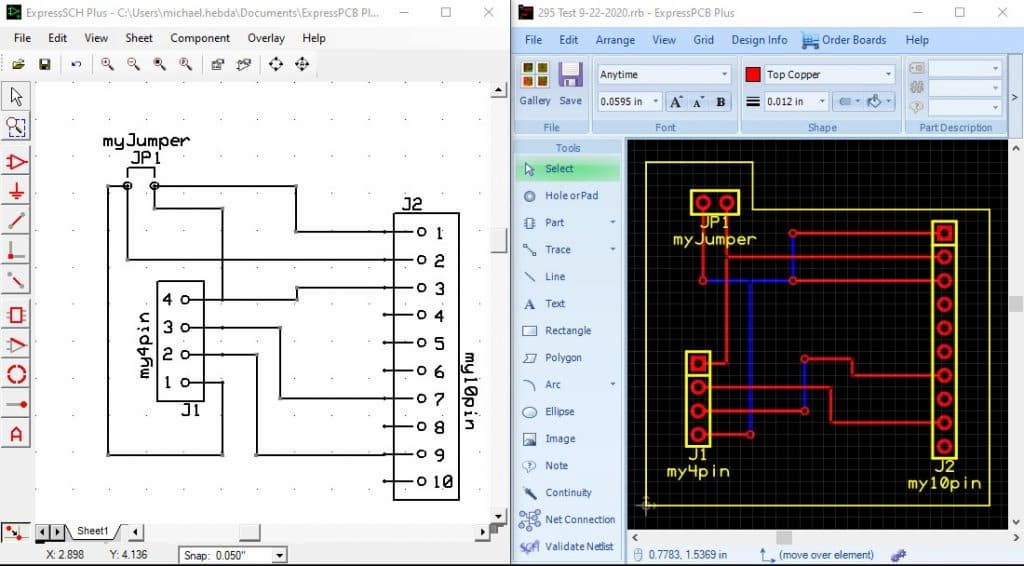
ExpressPCB is free PCB design software for beginners and experienced designers alike, and is favored by users for its ease of use, free access, and fast ordering process. Despite some limitations and file format issues, its great features and user support make it a PCB design tool worth considering, hence the 4-star rating.

